A development snapshot, grounded in source
This article follows repository commit 4ff49e0992e3, inspected on 19 October 2026. The public source is authoritative for implementation; the PCB graphics below are Alan’s supplied current design previews, while the repository links retain the editable KiCad source. They are design views, not photographs of manufactured hardware.
The source contains RTSP, pairing, discovery, decoding, playback and LVGL components. Their presence establishes implementation work, but does not establish Apple certification, compatibility with every sender, multi-room synchronisation or a completed end-to-end bench test. The repository name describes the project goal; this website does not turn that goal into an unsupported compatibility claim.
The newer P4-Audio-TFT release notes report clean DRC/ERC and a complete prototype layout. Those are dated design-review observations. Alan’s update on 21 October 2026 is that the PCB is awaited from JLCPCB; the new board specification will be created when it arrives. The new board has not yet been brought up. Stock figures in the older notes are dated snapshots, not live availability.
Two processors, two board directions
The P4 hosts application logic, the touchscreen and audio processing. Wireless networking is delegated to the C6 through the ESP-Hosted transport work found in the repository. This separates the high-throughput application side from the radio side; the transport and companion firmware must still agree for that division to work reliably.
RTSP · decode · buffers→ I²S →Codec / DAC
There are two distinct hardware designs. P4-WVM-ATSC6-V1 is the carrier for the castellated Waveshare ESP32-P4-Module. The newer P4-Audio-TFT has an ESP32-P4NRW32X and an ESP32-C6-MINI-1-H4 in its own design. Do not apply a module-carrier pinout to the chip-based board merely because both use the same processor family.
The official Waveshare product page identifies the 25 × 25 mm module with 1 mm castellated pitch, P4 plus C6H8, 32 MB PSRAM and 16/32 MB flash options. The module wiki provides the pin table and hardware resources. These links describe the actual core module, rather than a similarly named display development kit. Confirm the installed flash variant before changing the build profile.
LVGL: a usable appliance interface
The display integration creates an LVGL display and pointer input device, supplies a flush callback through LovyanGFX, and allocates a partial draw buffer with a PSRAM-first, internal-memory fallback. Touch coordinates are clamped to the configured display bounds. This is a useful separation: LVGL owns widgets and layout, while the graphics layer owns the panel and touch hardware.
The active PlatformIO environment requests a 480 × 320 landscape canvas and LVGL 9.3. The graphics driver names an ST7796 panel; touch is configured at I²C address 0x38 with FT6336/FT5x06-related settings. The KiCad library also contains ILI9488/FT6236 display parts. Those names are not interchangeable guarantees: compare the fitted display, its connector mapping and controller commands with the selected firmware before powering the screen.
The now-playing screen has title, artist and album fields, elapsed/duration labels, progress and playback state, wireless status and a volume slider. Artwork is decoded with TJpg_Decoder into RGB565 buffers and resampled to a 160 × 160 image. Empty metadata has fallback labels; the UI can remain meaningful before a sender delivers artwork.
There are stale comments in the graphics code: the executable configuration sets a 40 MHz SPI write clock while another comment refers to a 4 MHz/DMA-off baseline. Treat values and flags as the evidence, then verify the physical panel at a conservative clock. Keep screen updates alive during connection attempts and avoid blocking graphics work in the time-sensitive audio path.
From discovery to buffered audio
The service entry point checks connectivity, initialises NVS and playback settings, preallocates realtime resources, then starts timing, pairing, receiver, audio output and RTSP services. mDNS advertisement follows. A failure in one of the checked startup steps returns an error to the display rather than proving the whole receiver is ready.
The source tree separates RTSP connection/message handling, binary/XML property lists, HAP pairing helpers, metadata/artwork storage and timing modules. ALAC and AAC decoding are represented in the decoder implementation; the dependency list brings in codec-alac, libhelix and Arduino Audio Tools. Timing files include PTP and NTP work. This is the shape of a receiver pipeline, but file names alone do not demonstrate interoperability or clock accuracy.
On the playback side, buffering absorbs network jitter before PCM reaches I²S. The current output code uses a 64-frame start threshold and low-water handling. A useful bring-up log records connection events, buffer occupancy, decoder errors and underruns together; an audible dropout can otherwise be misdiagnosed as a display problem when its cause is transport starvation.
Module testing and the new board’s audio hardware
The KiCad revision notes describe an ES8388 headphone/microphone path and a separate PCM5102 line output. The headphone connector follows CTIA wiring: left, right, ground and microphone. The line-output jack carries left/right audio with ground on the remaining contacts. Line output needs an appropriate amplifier or powered input; it is not presented here as a headphone power stage.
The P4 module has an onboard ES8311 used for development and testing. The new custom PCB adds a 4-inch ILI TFT, PCM5102 and ES8388. These are two development stages: the ES8311 test configuration is intentional. Alan has not yet created the board specification for the new PCB and plans to do so when it arrives from JLCPCB.
the inspected firmware output file uses the module’s ES8311 test path. It currently selects AUDIO_DAC_BOTH, with an ES8311 primary and a non-blocking PCM5102 mirror. The secondary PCM5102 pin constants are BCLK 27, LRCK 32 and DOUT 33; primary pins come from build flags. The output-rate reconfiguration code forces 44.1 kHz.
Reconcile the codec driver, register initialisation, I²S clocks and GPIO assignments with the schematic. ES8311 code is not evidence of a working ES8388 driver. The new board specification and ES8388 configuration are planned work after PCB arrival, rather than a completed hardware bring-up.
Initial tests should use a known quiet PCM source and low gain, then check clocking, left/right channels, mute, noise and output levels. Test microphone bias and input selection separately. The board notes specify fixed microphone bias and require the ES8388 input/PGA settings to be handled by firmware. Avoid changing the codec and wireless transport simultaneously; a single known-good subsystem makes each subsequent fault easier to localise.
The new PCB: Alan’s design views
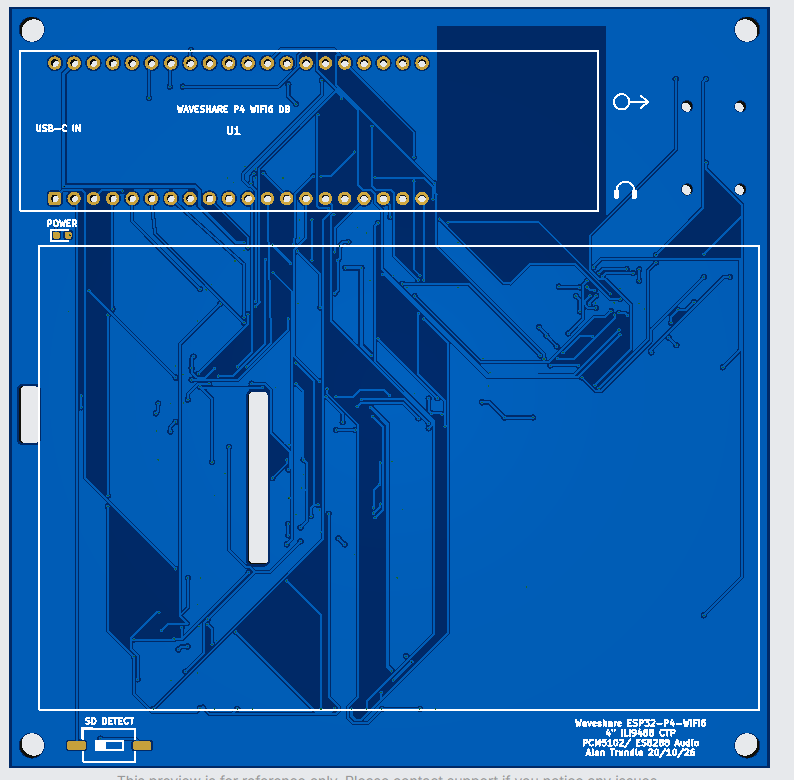
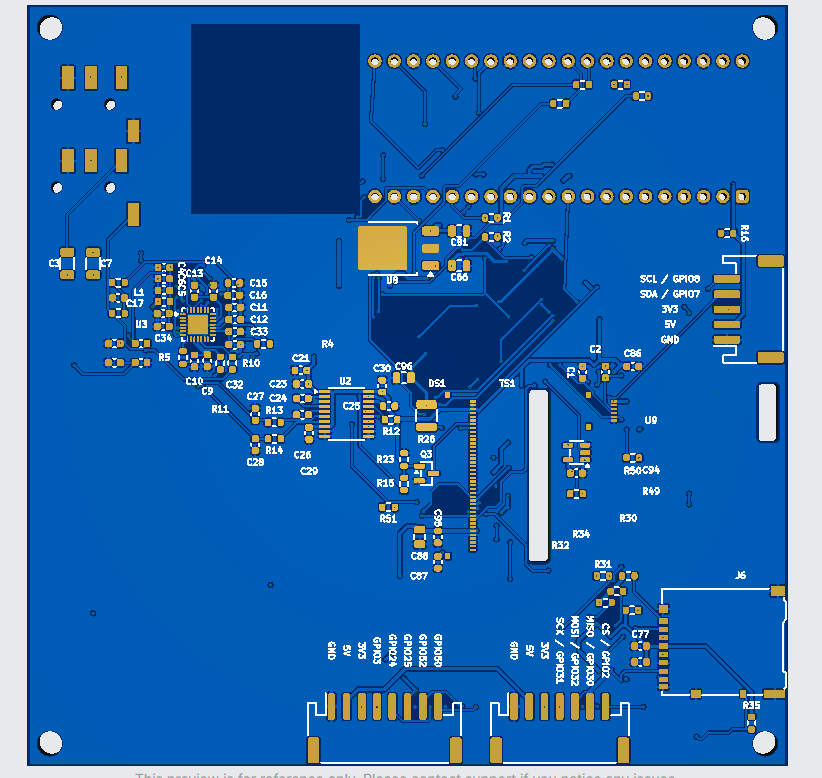
The two PCB graphics below were supplied by Alan Trundle and show the current module-based design with the additional 4-inch ILI TFT, PCM5102 and ES8388. They are design previews; the PCB is awaited from JLCPCB. Alan will create the board specification after it arrives. The module’s onboard ES8311 remains the development test codec.
Editable KiCad assets remain available in the linked repository. Its pinned design notes describe earlier source snapshots; the supplied graphics are shown separately as the current visual reference.
 Inspect ↗
 Inspect ↗
These are Alan’s supplied PCB design previews, not photographs of assembled hardware. Browse the repository’s KiCad files →
Build the firmware from the recorded environment
Scope: these commands describe the existing module test configuration. They do not build a completed specification for the new 4-inch ILI TFT / PCM5102 / ES8388 board; that specification is planned after the JLCPCB delivery.
The active esp32-p4-wifi6 environment uses PlatformIO, the Arduino framework, the pioarduino Espressif32 platform and an esp32-p4-evboard definition. It requests 16 MB flash and enabled PSRAM, a 115200-baud monitor and 921600 upload speed. The checkout also has ESP-IDF/CMake material, but this article follows the explicit PlatformIO profile rather than claiming those paths are equivalent.
Install Git and PlatformIO Core in a supported Python environment, then inspect the pinned source before building. On Windows, enabling long paths for this clone avoids the archived ESP-Hosted tree exceeding the default checkout path limit.
git -c core.longpaths=true clone https://github.com/alantrundle/P4-Airplay2-4inCtsLVGL.git
cd P4-Airplay2-4inCtsLVGL
git checkout 4ff49e0992e31a7bb84c0285204e39748c5306b7

# After the dependency/path and hardware checks below:
pio run -e esp32-p4-wifi6
pio run -e esp32-p4-wifi6 -t upload --upload-port YOUR_PORT
pio device monitor --port YOUR_PORT --baud 115200
Resolve the local assumptions before compiling
The profile contains absolute Windows include paths into a separate esp-hosted-mcu-main checkout. Obtain the matching ESP-Hosted source, map those paths to your machine and confirm which local Network library and transport modifications the build expects. The official ESP-Hosted MCU repository is a reference for host/companion relationships, not proof that its latest revision matches this project's custom integration.
The platform URL points to a moving stable release, and several Git dependencies are not fixed to immutable commits. Record the resolved PlatformIO package versions and Git revisions from a successful build. A fresh checkout on another date may select a different toolchain; do not describe this snapshot as a one-command reproducible release until those dependencies and the C6 firmware are pinned together.
Replace the configured serial-port assumptions and review network credentials locally before sharing builds or logs. Do not publish credentials, pairing material or a dump of persistent settings. Check display, touch, I²S and C6 transport pins against the actual revision: default header values, build flags and physical routing can differ.
Firmware compilation and device upload were not performed for this website release. The commands document the workflow and its known prerequisites; they are not a claim of a successful build on attached hardware.
A practical bring-up sequence
- Power and programming: inspect polarity and shorts, use controlled power, confirm P4 and C6 serial access, and verify the selected flash/PSRAM arrangement.
- Display and touch: show a fixed test pattern, confirm orientation and colours, then compare touches at all corners. Keep audio and networking out of this first test.
- Local audio: confirm the fitted codec driver, clocks and channel routing using known PCM data. Watch supply noise and amplifier mute behaviour.
- C6 transport: confirm companion firmware, reset/boot signals and SDIO configuration. Establish association, address assignment and stable packet transport before blaming RTSP.
- Receiver: test discovery, pairing, stream setup, metadata, artwork, volume and stop/reconnect separately. Log sender/device versions and test duration.
- Integrated load: combine artwork updates, wireless traffic, audio and SD-card activity. Record buffer failures, temperatures and recovery behaviour over long runs.
The repository's design review and release status notes remain the place to check fabrication readiness. A future tested release should add hardware revision, toolchain lock, C6 image version and an explicit interoperability matrix.
Sources and inspection record
- Pinned project source — 4ff49e0992e3 (GPL-3.0).
- PlatformIO configuration; graphics driver; LVGL UI; audio outputs.
- P4-Audio-TFT review and Waveshare carrier revision notes.
- Official Waveshare module, wiki and pinout, module hardware PDF.
- Espressif ESP-Hosted MCU.
Inspection date: 19 October 2026. Hardware and firmware observations are kept separate from measured results. No production readiness or certification is implied.